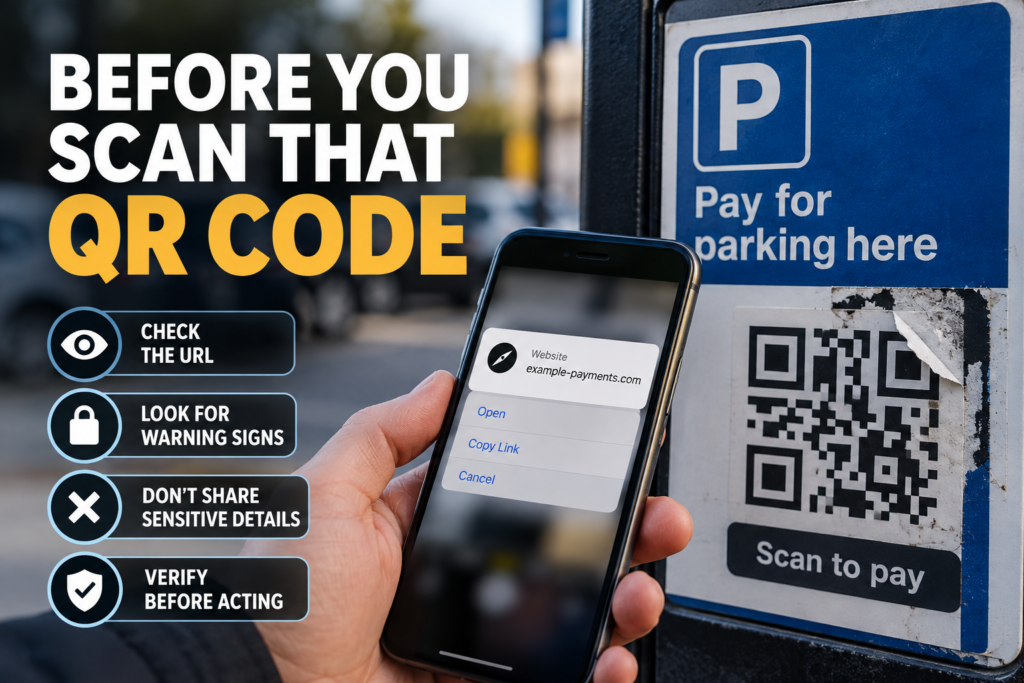
A QR code is not evidence of fraud. But fraudulent ones have led to reported losses. Here is what the evidence shows, and a ten-second check to run before you scan.
Imagine you have just parked. On the payment sign is a QR code, next to a name and logo you recognise. You lift your phone to scan it. Nothing about the moment feels unusual, and millions of legitimate QR codes are used safely.
This is a hypothetical, not a case study. But it points to a question that fraud can exploit: how do you know the code belongs to the organisation whose name is printed beside it?
The claim we are testing
A simple version of this story would say “QR codes are dangerous”. That is not what the evidence shows, so we tested something narrower. Can a fraudulent QR code send a person to a fraudulent destination? And can an ordinary person reduce that risk by checking where a code leads before acting?
First, the jargon
“Quishing” combines “QR” and “phishing”. Phishing is fraud that impersonates a trusted organisation to get you to hand over money or information. Quishing does the same job, but the bait is a QR code rather than a link or an attachment. That is all the terminology you need.
What the evidence shows
Between April 2024 and April 2025, Action Fraud recorded 784 reports involving fraudulent QR codes, with reported losses approaching £3.5 million.
That is a documented, measurable harm. It is also easy to over-read, so here is what the figure is not.
It is not the total cost of QR-code fraud. It counts reports received during a defined period. This evidence cannot tell us how many incidents were never reported.
It is not a measure of how common the problem is. 784 reports does not tell us how many fraudulent codes exist, how many people scanned them, or how likely any single scan is to end in a loss.
It is not a trend. The evidence covers one period. It does not show whether this type of fraud is rising, falling or steady, and we make no claim either way.
Why a QR code is useful to a fraudster
A QR code is a picture that stores information, very often a web address. The difficulty is that the destination encoded in a QR code is not directly readable by the human eye. A web address printed on a sign can be read and judged before you type anything. A QR code generally requires a device to decode the destination before you can assess it. Many phones now show a preview of the address before opening it, which lets you check first, but that is an extra step and it only helps if you look at it.
The code is also just an image, so it can be replaced, overlaid or distributed. The general risks include:
- a fraudulent sticker placed over a genuine code;
- a fake notice carrying a code of its own;
- a code redirecting someone away from a legitimate payment system;
- a message impersonating a legitimate organisation and containing a code.
Action Fraud’s release said quishing occurred most frequently in car parks, and described criminals using stickers to tamper with QR codes on parking machines. This article does not name any operator, and nothing here should be read as suggesting that any particular organisation’s signs are affected.
How the scam works
code → destination → impersonation → request → potential loss
The code is the doorway, not the room. It points to a destination, which might be a fake payment page, a page built to capture your login details, a site impersonating a genuine organisation, or another malicious address. The page looks like the organisation you expected. Then comes the request: pay here, sign in here, confirm your details.
Only if that request succeeds is there a loss. The fraud depends on what happens after the scan, not on the act of scanning. This article makes no claim that scanning a code, on its own, installs anything on your phone.
The test: warning sign or proof?
Here is where a sceptical reader should slow down, because a lot of consumer advice blurs two different things.
- A QR code being present does not equal fraud.
- An unfamiliar QR code does not equal fraud.
- A QR code on a parking meter does not automatically mean fraud.
The risk rises where the code looks physically added or replaced; the web address does not correspond with the organisation you expected; the site asks for information you did not expect to give; payment or login details are requested unexpectedly; urgency discourages checking; or you were pointed to the code by unsolicited contact.
Each of these is a risk indicator. None is proof of fraud. An indicator tells you to slow down and verify. Equally, the absence of indicators does not prove a code is safe.
THE 10-SECOND QR CHECK
A warning check, not a guarantee. It will not catch every fraudulent code.
1. LOOK. Before scanning a public code, inspect it. Does it look like a sticker placed over another code? Does the sign look altered? Does anything clash with the surrounding branding?
2. PREVIEW. Use your phone’s built-in camera or QR function. Where your device shows a preview, read the destination address before you open it.
3. CHECK THE DOMAIN. Ask: is this actually the organisation I meant to visit? A familiar logo is not enough. The web address is what matters.
4. WHEN MONEY IS INVOLVED, VERIFY INDEPENDENTLY. For parking, bills, deliveries, accounts or similar payments, reach the organisation another way: its official app, a website you type in yourself, or another verified contact method.
5. STOP IF SOMETHING CHANGES. If a code that seemed to exist for one purpose suddenly asks for banking credentials, passwords, unusual personal information, cryptocurrency or unexpected authentication details, stop and verify before going further.
Already scanned one?
Scanning a code does not automatically mean you have been defrauded or infected. What matters is what happened next.
WHAT TO DO IF YOU’VE ALREADY SCANNED ONE
You only opened the page. If it looks suspicious, close it. Do not enter credentials or make a payment.
You entered a password. Change it through the genuine website or app. If you use the same password elsewhere, change it there too.
You entered card or bank details, or sent money. Contact your bank or payment provider promptly, using a contact method you have verified independently.
You downloaded software. Use your device’s security processes and get reputable technical help where needed.
Then report it. In England, Wales and Northern Ireland, use Report Fraud online or call 0300 123 2040. In Scotland, contact Police Scotland on 101.
Where to report
The figures in this article come from Action Fraud, which operated the reporting service when the cases were recorded. On 4 December 2025, Action Fraud was replaced by Report Fraud for England, Wales and Northern Ireland.
If you need to report fraud or cybercrime now, use Report Fraud online or call 0300 123 2040. If you live in Scotland, or the crime happened there, contact Police Scotland on 101.
If you are in Northern Ireland: the evidence here does not show that Northern Ireland has a particular QR-code problem, and we are not suggesting it does. The national fraud-reporting system behind these figures includes Northern Ireland, and the protective steps in this article apply here exactly as they do elsewhere.
What remains unresolved
Action Fraud’s release does not provide an exact breakdown of the 784 reports between physical locations and codes delivered in messages. We also do not know how common fraudulent codes are compared with legitimate ones, or whether reports are rising or falling. A verified threat is not the same as a measured epidemic, and this article does not claim one.
VERDICT
VERIFIED THREAT: VERIFY BEFORE ACTING
Action Fraud recorded 784 reports involving fraudulent QR codes between April 2024 and April 2025, with reported losses approaching £3.5 million.
But a QR code is not suspicious merely because it exists. The important point is where the code sends you, and whether that destination is genuinely connected to the organisation you meant to deal with.
Evidence grade: V2, Strongly Supported
Sources
- Action Fraud, “New quishing alert: £3.5 million lost last year to fraudulent QR codes”, 20 June 2025.
- Report Fraud, “Report Fraud service goes live”, 4 December 2025.

Leave a Reply